Loading
CASE STUDY · LEADSTRACKR

Flagship Product · Functional Platform · Deployment Pending

LeadsTrackr

A multi-tenant CRM and growth platform designed for agencies and businesses that need one connected system for leads, pipelines, appointments, automation, websites, AI chatbots and client operations.

My Role Product strategy, architecture, UX and Rails development
Product Model Platform → Agencies → Client sub-accounts
Core Stack Ruby on Rails, PostgreSQL, Hotwire and Stimulus
Current Stage Functional locally; public deployment pending

The Product

The Problem

Agencies operate across disconnected tools, accounts and handoffs.

Lead capture, opportunity management, appointments, client access, websites, forms and follow-up often live in separate systems. That fragmentation creates duplicated work, unclear ownership and weak visibility across the customer journey.

LeadsTrackr is being built as an operating system for those connected workflows—not simply another contact database. The product gives an agency one platform while preserving clean boundaries between its own team, each client workspace and LeadsTrackr’s platform administration.

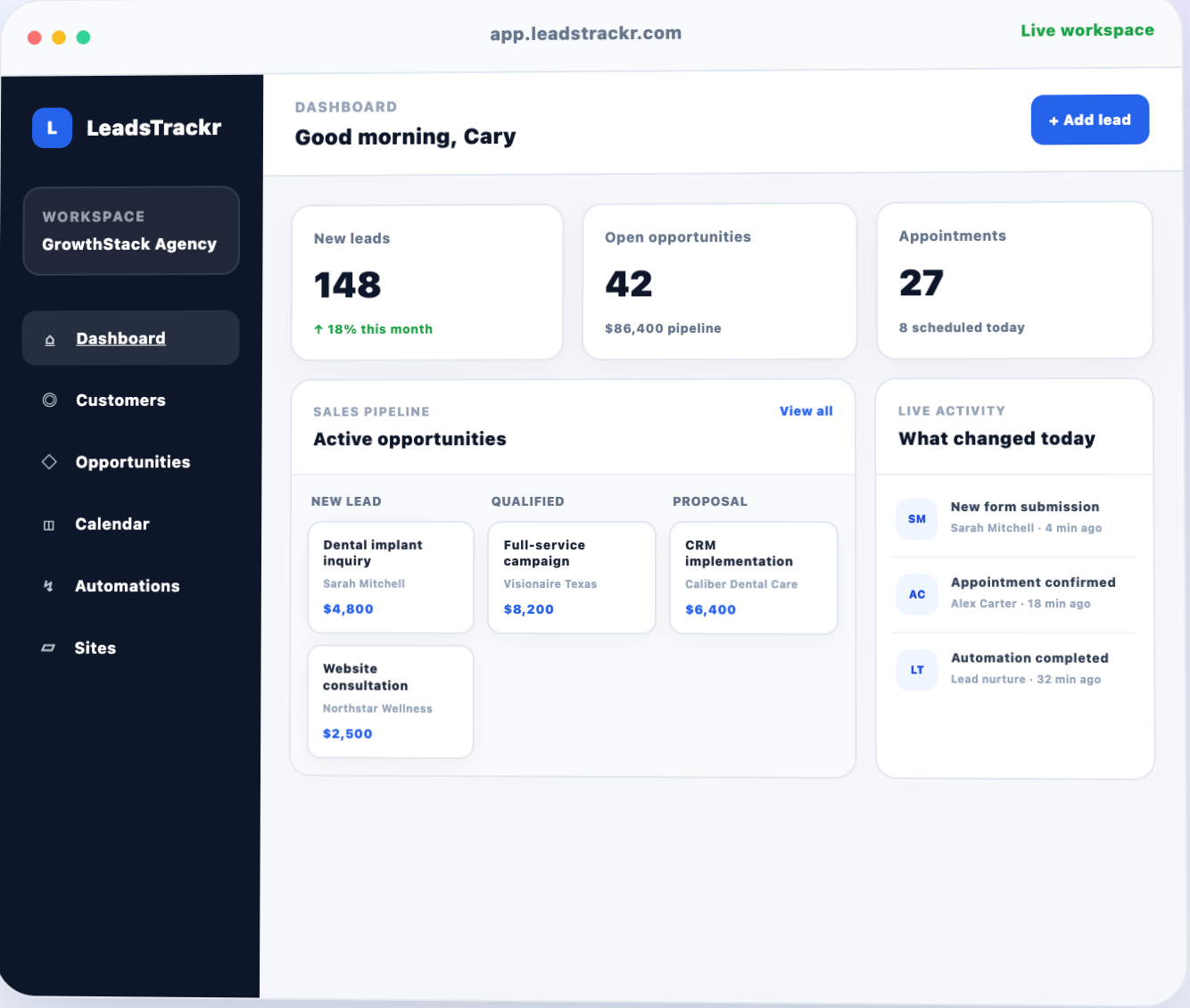
LeadsTrackr agency CRM dashboard showing workspace navigation, metrics, opportunities and activity
The agency dashboard brings performance, pipeline activity, appointments and operational changes into one workspace.

Platform Architecture

A Foundational Product Decision

Multi-tenancy was designed before feature sprawl.

The product uses three distinct operating layers. LeadsTrackr platform staff administer the SaaS itself. Agencies manage their teams and client portfolio. Sub-accounts isolate the day-to-day customer data and workflows belonging to each client or business location.

Why This Matters

Permissions follow responsibility.

Platform administration is not modelled as a special agency. That keeps ownership, support access, billing responsibilities and future capability-based permissions from leaking into customer workspaces.

01

LeadsTrackr Platform

Platform staff, agency oversight, support context and future commercial administration.

Platform Layer
02

Agency Accounts

Agency owners, teams, shared operations, snapshots and access to multiple client workspaces.

Agency Layer
03

Client Sub-Accounts

Isolated leads, pipelines, appointments, automations, forms, websites, chatbots and customer activity.

Workspace Layer

What I Built

01 · ACCOUNT SYSTEM

Agency & Workspace Architecture

Agency accounts, client sub-accounts, owner memberships, scoped access, workspace switching and a separate platform-administration context.

  • Agency and sub-account boundaries
  • Team memberships and access rules
  • Self-service agency onboarding

02 · CRM

Leads, Pipelines & Operations

Connected records for leads, opportunities, pipeline stages, appointments, tasks, notes, activity and conversation history.

  • Lead and opportunity workflows
  • Appointments, tasks and notes
  • Operational activity timeline

03 · AUTOMATION

Visual Workflow Engine

Trigger, wait, condition and action nodes with branching, execution logs and the ability to test a workflow against a selected lead.

  • Yes/no conditional branches
  • Execution history and status
  • Lead-based workflow testing

04 · DIGITAL EXPERIENCES

Forms, Surveys, Funnels & Websites

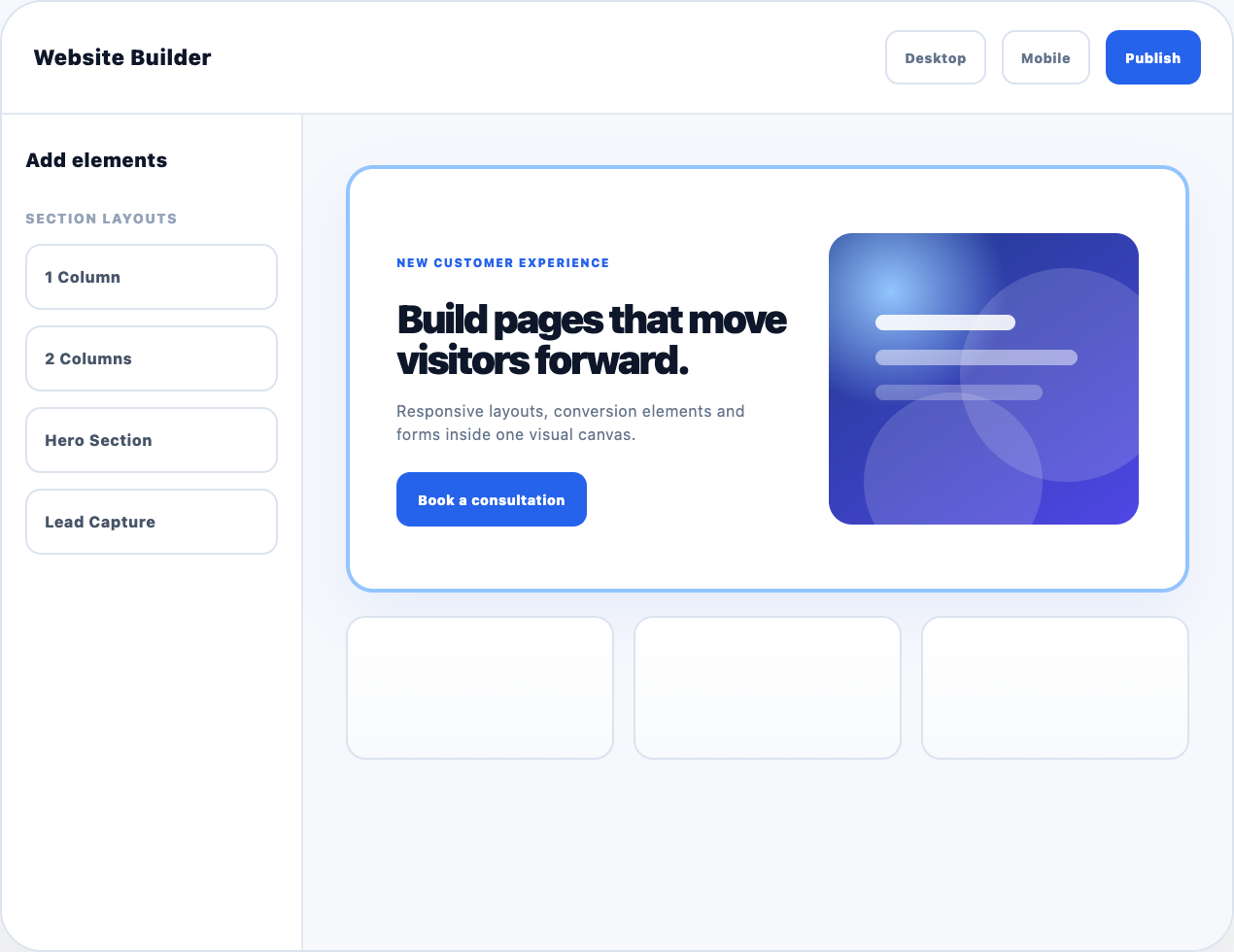
A structural visual builder with sections, rows, columns and elements, responsive controls, multi-page navigation and public publishing.

  • Reusable forms and surveys
  • Funnel and website builders
  • Public submissions and attribution

05 · PLATFORM

Administration & Onboarding

Public registration creates the user, agency, owner membership and first sub-account while platform staff retain a separate oversight area.

  • Platform dashboard and agency directory
  • Agency context switching
  • Subscription-ready account foundation

06 · PRODUCT EXPERIENCE

Publishing, Accessibility & Reliability

Clean public URLs, canonical metadata, responsive inheritance, publishing validation, accessibility improvements and regression tests.

  • Draft preview and published routes
  • Responsive design controls
  • Minitest regression coverage

07 · AI WEBSITE CHATBOTS

Sub-Account Chat Agents & Widgets

Configurable AI agents and publishable website widgets scoped to the correct sub-account, with instructions, knowledge, welcome messaging and autopilot or handoff response modes.

  • Agent and widget configuration
  • Draft, publish, unpublish and archive lifecycle
  • Embeddable website chat experience

08 · CONVERSATIONS

Webchat, Lead Context & Activity

Persistent conversations and messages preserve website-chat context, connect activity to the correct workspace and can associate a visitor with an existing or newly captured CRM lead.

  • Conversation and message records
  • Lead association and webchat activity events
  • Widget embeds added to LeadsTrackr and CaryWood.co
AI Website Chatbots

From Website Visitor to CRM Context

The chatbot is part of the customer system—not a disconnected popup.

I built an AI website-chat system inside LeadsTrackr so each sub-account can configure its own agent and widget while conversations remain attached to the correct workspace, lead and activity history.

Widget embeds have already been added to the LeadsTrackr marketing website and CaryWood.co. Public conversations will activate once the Rails application is deployed to a production host.

01

Website Embed

The published widget is installed on LeadsTrackr and CaryWood.co.

Public Surface
02

Sub-Account AI Agent

Instructions, knowledge, response mode and widget messaging stay workspace-specific.

Agent Layer
03

Conversation & Messages

Persistent records preserve status, timing and the complete webchat exchange.

Conversation Layer
04

Lead & Activity Context

Chat activity can connect with the CRM lead record and operational timeline.

CRM Layer
LeadsTrackr CRM dashboard with agency navigation and operational metrics
The CRM and operations workspace connects account context with day-to-day activity.
LeadsTrackr visual website builder with page structure and responsive editing controls
The visual builder adds responsive pages and funnels to the same customer platform.

Key Product Decisions

Decision 01

Treat tenancy as product architecture.

Account boundaries, membership and permissions were built into the foundation so new modules do not have to retrofit customer isolation later.

Decision 02

Build connected vertical slices.

Each sprint moves one capability from data model to authorization, interface, browser verification and automated tests before expanding scope.

Decision 03

Keep platform oversight separate.

LeadsTrackr’s own staff and permissions belong to the SaaS platform, not inside a pretend agency account. This leaves room for support, finance, sales and developer capabilities later.

My Role & Engineering Approach

End-to-End Ownership

I designed the product and built the system.

LeadsTrackr began from operational problems I already understood through years of CRM, advertising, funnel and client-delivery work. I translated those workflows into the product model, interface and Rails implementation.

  • 01 Product positioning, scope and feature priorities
  • 02 Domain modelling and multi-tenant architecture
  • 03 Rails controllers, services, authorization and views
  • 04 Builder UX, responsive behaviour and public publishing
  • 05 Automated tests, browser checks and Git checkpoints

Technology

A conventional Rails foundation.

The stack prioritizes maintainability, relational clarity and focused JavaScript rather than unnecessary infrastructure complexity.

Ruby 3.3.5 Rails 7.1.6 PostgreSQL Hotwire Stimulus Active Storage Minitest OpenAI API

Development Practice

Safe batches over uncontrolled rewrites.

Work is split into testable checkpoints. Each batch includes explicit file changes, focused tests, browser validation, regression checks and a clean commit before the next product decision.

Current Stage

Functional Platform · Deployment Pending

The product is built and tested; public hosting is the remaining launch dependency.

LeadsTrackr already contains a connected CRM, automation engine, multi-tenant account structure, Sites platform and AI website-chat system. The Rails application currently runs locally, so the installed website widgets cannot serve public conversations until production deployment.

Core CRMFunctional
AutomationsFunctional MVP
Sites PlatformFunctional Builder
AI Website ChatbotsFunctional · Awaiting Deployment
Platform AdministrationFoundation Complete
Public DeploymentHosting Setup Pending

Deployment Status

Ready to deploy once hosting is confirmed.

The Heroku GitHub Student offer application is currently under review. Once hosting is available, the remaining work is production configuration, database setup, asset deployment and end-to-end verification of the embedded chat widgets on both websites.

Marketing website live · Rails application deployment pending

Product Strategy · Architecture · Rails Development

LeadsTrackr demonstrates how I turn operational knowledge into a connected software product.

Explore the rest of my software and client work, review my development profile or start a conversation about product engineering and growth systems.

© 2026 Cary Wood. Building software, tools and digital systems.

+
+